AI Assistant in the CMS: Generate, Translate, Optimize
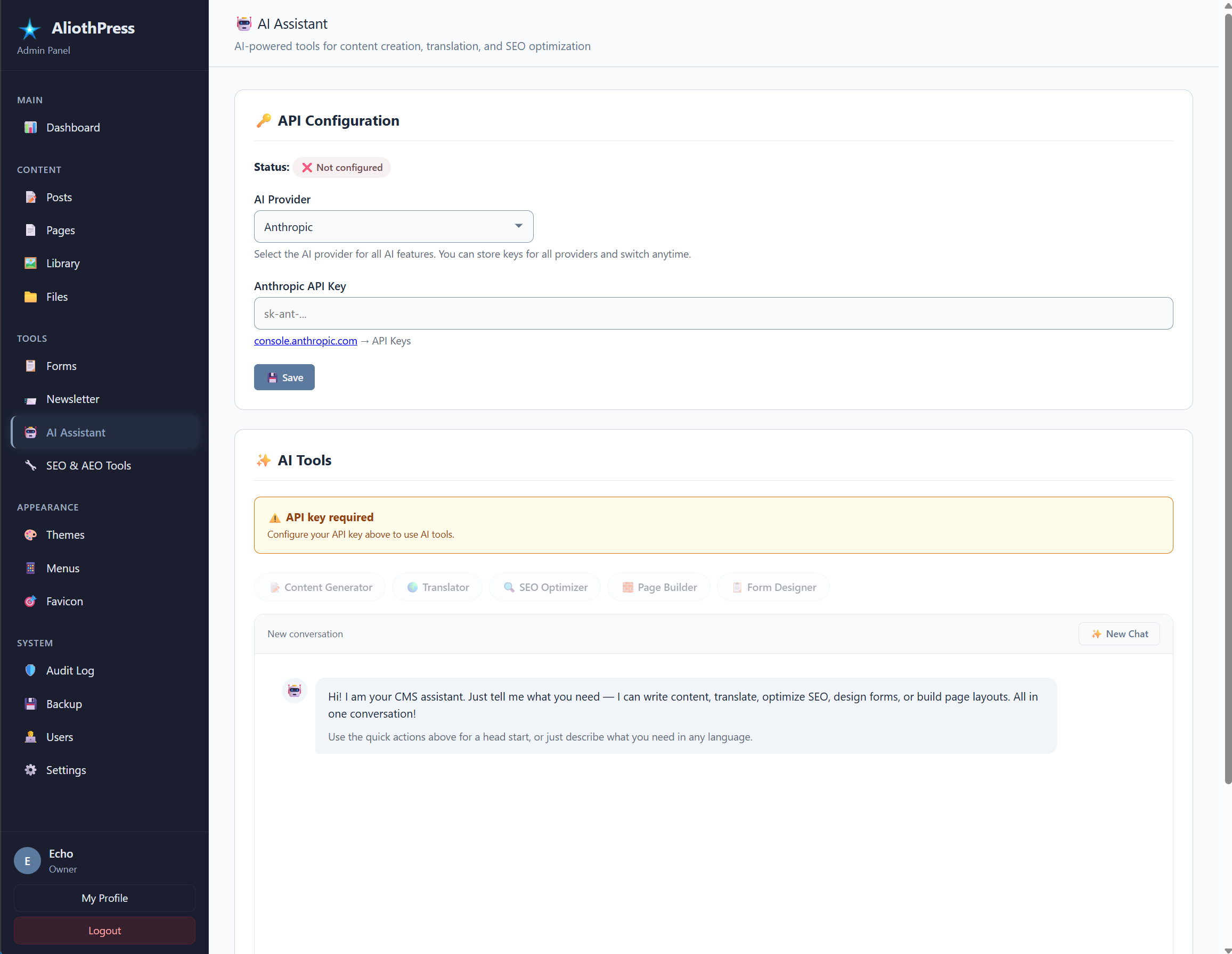
AliothPress ships with a built-in AI Assistant that writes complete posts and pages, translates content into any of the 31 site languages, generates SEO metadata, builds visual page layouts from a text description, drafts newsletters, and creates form fields. It supports three providers, Anthropic Claude, DeepSeek, and Google Gemini, connected with your own API key. Every request travels server-to-server from your CMS to the provider, your API keys are stored encrypted, and the assistant works in whatever language your admin panel is set to.
One assistant, six jobs
The assistant is a single engine behind every AI feature in the admin panel, and it covers the full content lifecycle.
Writing posts and pages. Describe what you need and the assistant returns a complete draft: title, full HTML content with proper heading structure, an excerpt, meta title, meta description, keywords, and a set of 3 to 5 FAQ pairs related to the topic. The FAQ pairs land in the FAQ editor and become FAQPage structured data, the format answer engines quote directly. Generated drafts follow the answer-first pattern, stating the direct answer early, which is exactly what AI citation favors.
Translating. One click translates a post, page, form, or newsletter into a target language while preserving all HTML formatting, tone, and structure. The result is linked into the source's translation group, so hreflang, the language switcher, and the sitemap stay correct automatically.
Optimizing SEO. Give the assistant an existing page and it returns tuned meta titles within 60 characters, descriptions within 160, keywords, and Open Graph fields, together with a short explanation of what it changed and why, written in your admin language.
Building page layouts. Describe a page and the assistant assembles it from visual builder blocks: headings, text sections, columns, FAQ accordions. Layout generation runs with an extended budget (larger output window and a longer timeout), because a whole page is a bigger job than a paragraph. The result opens in the builder with every block editable.
Drafting newsletters. Subject line and campaign body from a prompt, in the editor where you already write campaigns.
Generating forms. Describe a form and the assistant proposes its fields, ready for the form builder to refine.
Conversational refinement
Every mode keeps the conversation. The assistant receives the history of the current session, so follow-up instructions work naturally: ask for a post, then ask to make it shorter, add a section, or shift the tone. There is also a free chat mode for questions and advice, and the assistant switches between tasks inside one conversation.
Three providers, your choice, your key
Anthropic Claude, DeepSeek, and Google Gemini are supported side by side. You store a key for one provider or for all three, pick the active one on the AI page, and switch at any time. Sensible default models are preconfigured for each provider and can be changed in settings.
The keys are encrypted with Fernet before they reach the database, the same mechanism that protects SMTP passwords. The settings page shows a short preview of each stored key. Older installations that stored a key in plain text get it migrated to encrypted storage automatically on the next save.
Privacy and control
Requests go from your server to the provider you configured, using your key. Visitor IP addresses and browser data stay on your site; the person reading your published page triggers zero AI traffic. The endpoint is rate-limited, and the assistant works only inside an authenticated admin session. The AI Assistant is also a separate feature from WebMCP: the assistant is AI working for your site under your key, while WebMCP lets external agents use tools your site exposes. Both are covered in the WebMCP article.
Working in 31 languages
The assistant answers and generates in the language of your admin panel, so a German editor gets German drafts and German explanations. Content generation targets any of the 31 site languages, and translation moves content between them while the translation group system keeps everything linked.
The AI Assistant turns AliothPress content work into a description of intent: describe the post, and it arrives with SEO fields and FAQ pairs ready for answer engines, as covered in Built-in SEO and AEO; describe the page, and the Visual Page Builder opens it as editable blocks; one click carries any of it into another language, as described in Multilingual Websites. For AI agents acting on your site from the outside, see WebMCP.