AliothPress: a CMS for AI Agents (WebMCP Built In)
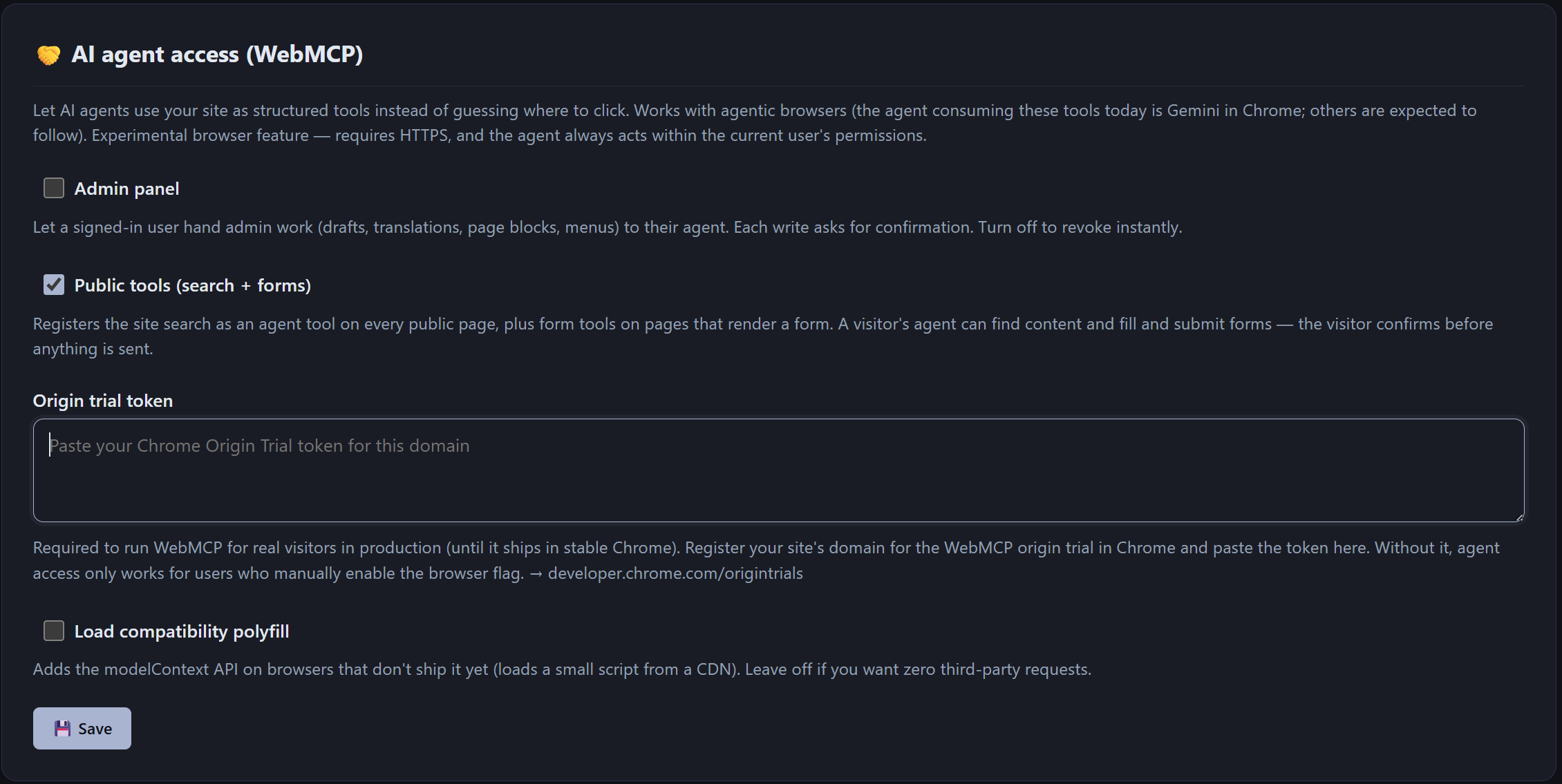
AliothPress is a self-hosted CMS with native support for AI agents through WebMCP. Any site built on it can let AI agents search its content, describe and submit its forms, and, inside the admin panel, create posts, build pages, upload images, and translate content. The feature is off by default and controlled by two switches on the AI Assistant page in the admin panel. AliothPress never enables AI agent access automatically. Site owners explicitly decide whether to expose public tools, admin tools, both, or neither.
What is WebMCP
WebMCP is an emerging web standard that lets websites offer tools to AI agents, the same way robots.txt offers rules to search engines. A site declares what an agent is allowed to do. The agent discovers it automatically.
- Discovery: every AliothPress site answers at
/.well-known/webmcpwith a machine-readable manifest - In-page registration: tools register via
document.modelContext/navigator.modelContext - Optional polyfill: a compatibility polyfill adds the API on browsers without native support, switched on with one checkbox on the AI Assistant page. The origin trial token is pasted on the same page
WebMCP support ships in the CMS core, ready to use as installed, and relies on zero plugins or third-party services.
What AI agents can do on your site
With the public surface enabled, an agent visiting any page of your site can:
- Search your content:
search_sitequeries published posts and pages - Read the site overview: auto-generated
/llms.txtsummarizes the site for AI, grouped by language - Understand your forms:
describe_formreturns fields, types, and requirements - Submit forms for the visitor: booking, contact, signup. The visitor asks, the agent fills and submits the form
Example: a visitor tells the AI agent in their browser "book me into the Saturday workshop". The agent finds the form on your page, fills it, and submits it. Your honeypot spam protection and rate limits still apply.
What AI agents can do in your admin
With the admin surface enabled, an agent working inside your authenticated admin session gets up to 24 tools:
- Content: generate posts and pages, set their slug, SEO, social card, FAQ, and Schema.org metadata in the same call, create language versions linked into one translation group, translate text, optimize SEO metadata, and edit existing posts and pages field by field: only the fields the agent names change, everything else is preserved
- Media: upload images into the media library, one at a time or as a whole set under a single approval (the same pipeline as human uploads: optimization, WebP/AVIF variants, EXIF stripping, mandatory alt text), and attach them as the featured, Open Graph, or Twitter image in one step
- Page building: create Page Builder pages singly, in batches, or as translations, read a machine-readable reference of every block type, and set or update page blocks
- Bulk work: create dozens of posts or pages in one go with a single approval dialog, Page Builder layouts and image sets included, ideal for migrations and documentation runs
- Site management: build menus, check slugs, list and search content, navigate admin sections
The agent acts as the signed-in user and reuses the exact routes humans use: same permissions, same validation, same sanitization, same audit log. A separate agent backdoor simply does not exist in the codebase.
One thing an agent can never do is publish. Agents create and edit drafts. A request to publish is demoted to a draft server-side, independently of what the agent or its tools claim. The rule is enforced twice, in the tool layer and on the server, so publishing stays a human decision, made in the admin UI.
Approvals that scale with the job
Every write asks the signed-in user for confirmation. For one post, that is one dialog. For bulk work, the dialogs scale instead of multiplying:
- Batch approval: when an agent creates many posts or pages at once, or uploads a set of images, a single dialog lists every item with checkboxes: select all, or approve a hand-picked subset. Skipped items are reported back to the agent, so it knows exactly what happened to each one
- Autopilot: any approval dialog can enable time-boxed auto-approval: 15 or 60 minutes, in that browser tab only. A visible badge counts down and revokes with one click. Only a human can switch it on. It does not exist as an agent tool. And even under autopilot, publishing remains impossible
Migrate from another CMS without an export
Because an agent can read your old site in one browser tab and write drafts into AliothPress in another, you can migrate content without export files, import plugins, or dragging along the old site's markup. The agent rewrites each page cleanly, uploads the images (which come out optimized, with alt text), attaches featured and social images, rebuilds designed layouts natively in the Page Builder, and files everything as drafts for your review. The old site's inline styles, broken shortcodes, and accumulated mistakes stay behind, because not a single line of its code is copied. The step-by-step walkthrough is in the documentation: Migration to AliothPress.
WebMCP and the AI Assistant: two different features
AliothPress also ships a built-in AI Assistant in the admin panel. It is a separate feature, and the two are easy to tell apart:
- AI Assistant: your CMS talks to an AI provider (Anthropic Claude, DeepSeek, or Google Gemini) server-to-server, using your own API key, to generate content, translate, and optimize SEO for you
- WebMCP: external AI agents, running in a visitor's or editor's browser, use tools your site exposes to them
- They work together: the WebMCP admin tools for generation, translation, and SEO run through the same AI Assistant engine and the provider you configured
In short: the AI Assistant is AI working for your site. WebMCP is AI working with your site.
Control and privacy
- Off by default: a fresh install exposes zero agent tools
- Two independent switches: public site and admin are enabled separately
- Drafts only: agents can save and edit drafts but can never publish, enforced server-side, not just in the tools
- Honest when disabled: the manifest reports
enabled: false. Admin agent endpoints return 404 as if they do not exist - Visitor data stays private: form submissions are excluded from agent endpoints entirely
- Every action logged: agent-driven changes appear in the audit log like any admin action
How to enable it
- Open the AI Assistant page in the admin panel
- Turn on Public tools (search + forms), Admin panel, or both
- Done: the manifest at
/.well-known/webmcpstarts announcing your tools
Why this matters now
People increasingly reach websites through AI agents and chat interfaces instead of browsing. A site an agent can read, search, and act on gets recommended, cited, and used. A site an agent cannot parse gets skipped.
AliothPress prepares your site for both sides of that shift:
- For AI answer engines:
/llms.txt, FAQPage schema, Speakable markup, answer-first content structure - For AI agents: WebMCP tools for search, forms, and content management
AliothPress ships WebMCP support today, in the core, at no extra cost, on a self-hosted CMS you fully control. If you are choosing a platform for a site built for the AI-first web, this is what it was made for. Download AliothPress free, read the Guide for AI Agents or CMS documentation.