CMS Form Builder: Double Opt-in, Anti-Spam
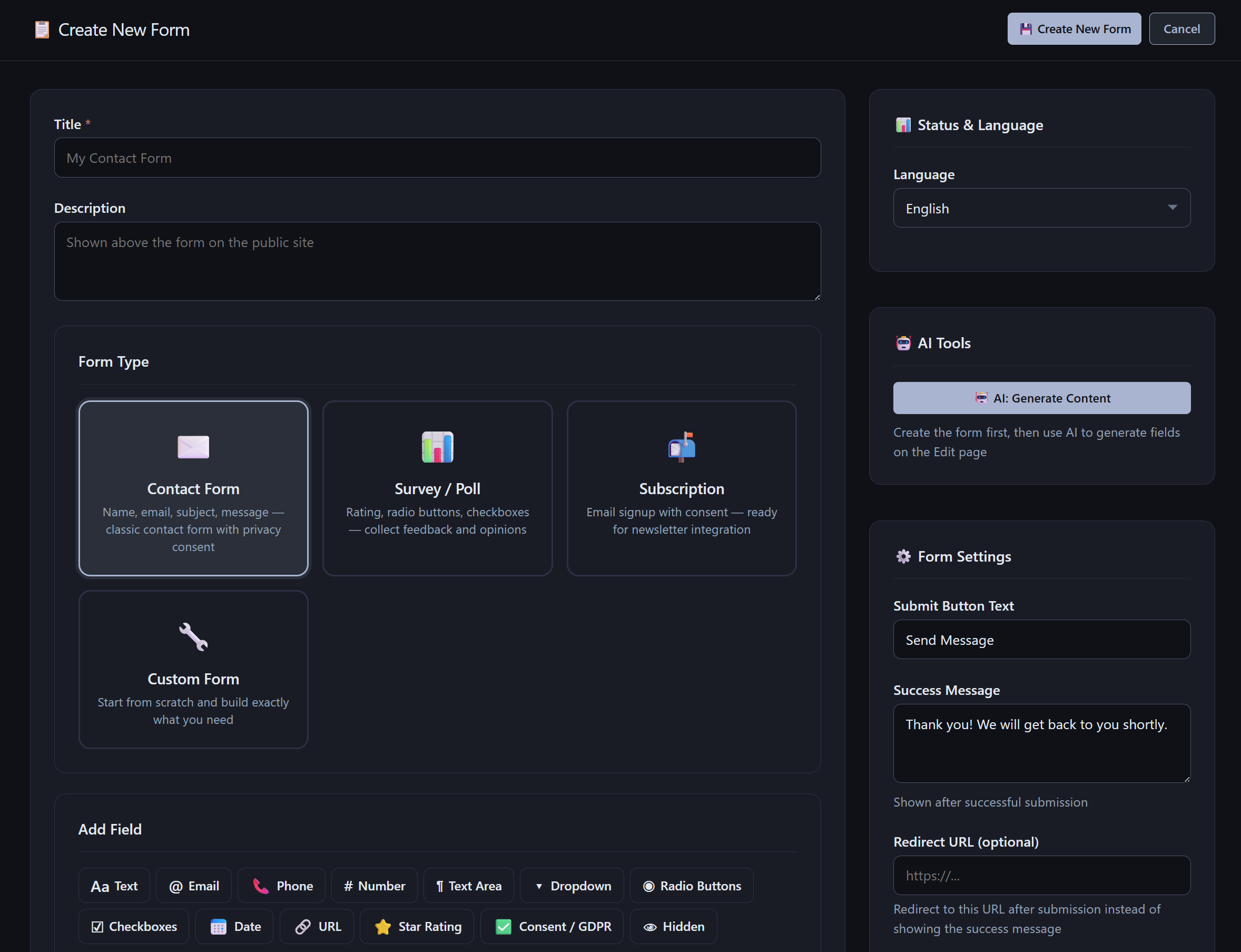
AliothPress includes a form builder with 13 field types, four ready-made templates, and per-form control over notifications, confirmation emails, double opt-in, and anti-spam protection. Forms are placed on any page through the page builder, submissions are stored with status workflow and export to CSV and Excel, and every form can be translated into any of the 31 site languages, manually or with one AI click. AI can also generate the fields of a new form from a description.
Four form templates
Creating a form begins with a template choice:
- Contact Form: name, email, subject, message, and a privacy consent checkbox
- Survey / Poll: ratings, radio buttons, and checkboxes for collecting opinions
- Subscription: an email signup with consent, prepared for newsletter targeting
- Custom Form: an empty canvas
A template is a head start. Every generated field remains editable, removable, and reorderable.
13 field types
Text, Email, Phone, Number, Text Area, Dropdown, Radio Buttons, Checkboxes, Date, URL, Star Rating, Consent/GDPR, and Hidden. Fields are added with one click, dragged into order, duplicated, marked required, or removed. The Consent field renders a checkbox linked to your privacy policy, and the Hidden field passes invisible values along with the submission, useful for tracking which page or campaign a submission came from.
Behavior settings per form
Each form controls its own behavior:
- Submit button text and the success message shown after submission
- An optional redirect URL that replaces the success message with a redirect
- Notification email: the address that receives a message on every submission, switchable per form
- Store submissions in database: on by default and can be turned off for forms that should only notify
- Confirmation email to the visitor: a thank-you message sent to the address they entered
- Double opt-in: the visitor must click a link in the confirmation email before their address counts as confirmed. The signup workflow this enables for newsletters is covered in the Newsletter article.
All outgoing messages use the site's SMTP connection, described in the Connecting Email article.
Honeypot and rate limiting against spam
The honeypot method catches bots through an invisible field that humans never fill, so visitors face no puzzles and no third-party verification service watches them. Submissions are also rate-limited per IP on the server. Anything caught lands in the Spam status instead of your inbox, and spam submissions are excluded from newsletter audiences automatically.
Submissions with a workflow
Each form has its own submissions view with New, Read, Archived, and Spam statuses, search by the submitted data, bulk actions, and a detail view per submission. Two export buttons produce CSV and Excel files of the collected data. When double opt-in is active, each submission shows its confirmation state.
Multilingual forms
A form belongs to a translation group like posts and pages. The Translations panel on the edit screen creates a linked version in another language, and two AI buttons take the work off your hands. "AI: Translate & Create" builds the linked copy with AI-translated fields in one click. "AI: Translate all fields" goes a step further and translates everything at once: the title, the description, every field label, placeholder, option, consent text, and the submit button, creating the translated form automatically, connected to the original. A German visitor meets the German form, and the submission records which language version was used.
Placing a form on the site
Forms go onto pages through the Form block in the visual page builder: pick the form, publish the page. AliothPress tracks where each form is embedded, and deleting a form cleans up its references, so pages never render a dead form.
Forms that AI agents can fill
With WebMCP enabled, public forms double as callable tools for AI agents such as agentic browsers. An agent reads the form's fields in a structured way, fills them, and submits through the same endpoint as a human visitor, so the honeypot, the per-IP rate limit, and all validation stay in force on the server. Nothing changes for regular visitors, and the whole layer is off until the owner switches it on from the AI Assistant page. Discovery and the full agent toolset are described in the documentation under Agent Access (WebMCP).
Key facts about the AliothPress form builder
13 field types, four templates plus AI field generation, per-form notification and confirmation emails, double opt-in, honeypot and rate limiting against spam, a submissions workflow with New/Read/Archived/Spam statuses and CSV and Excel export, translation groups with one-click AI translation, embedding through the page builder with automatic reference cleanup, and WebMCP tools that let AI agents read, fill, and submit public forms with server-side spam protection intact.