Connecting Email over SMTP
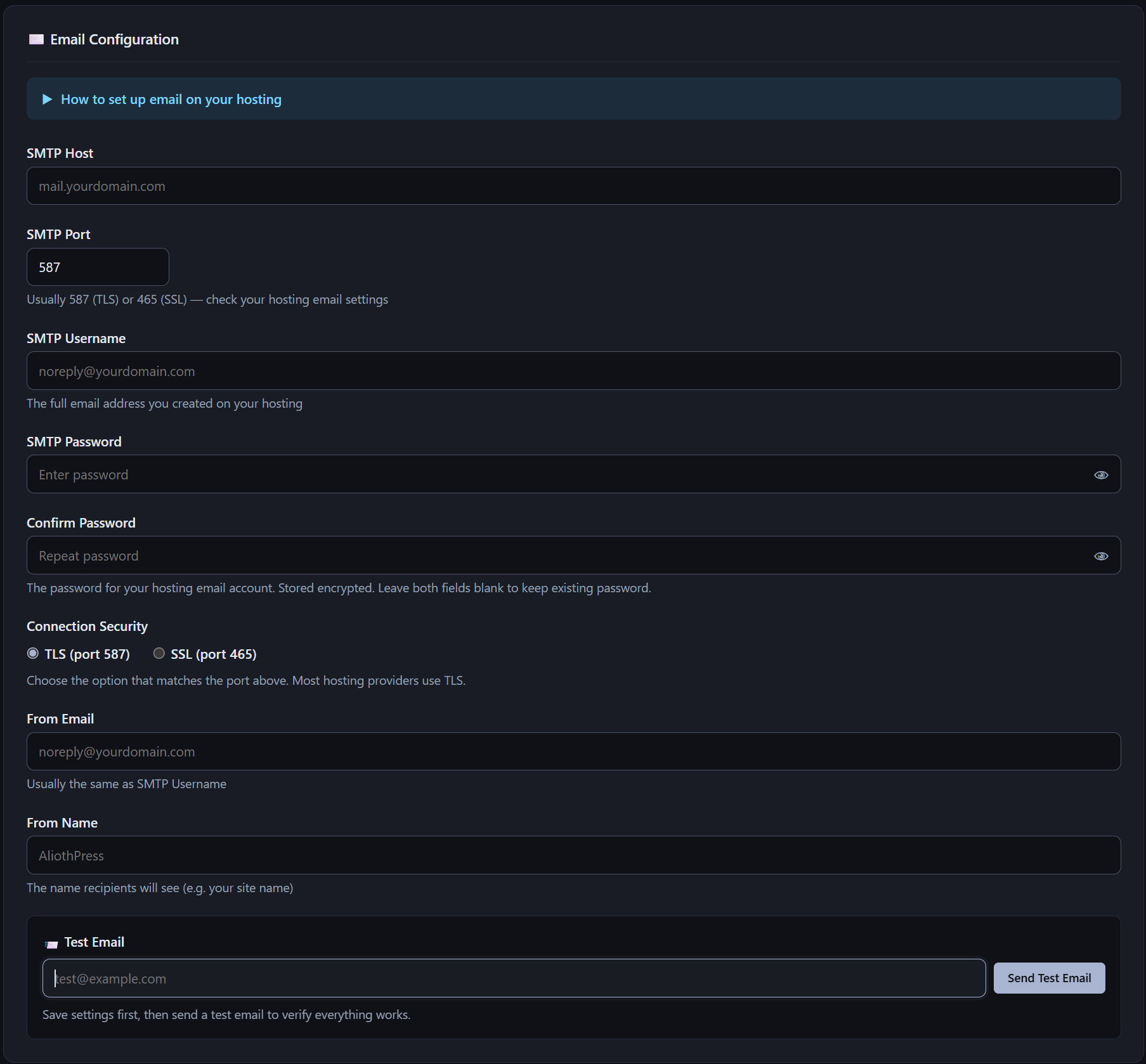
AliothPress sends email through any SMTP server: a mailbox from your hosting provider or an SMTP relay service. Configuration lives in the Settings page, takes five fields, and includes a test send button plus a built-in setup guide. The SMTP password is stored encrypted. One working connection powers everything the CMS mails: user invitations, form notifications, visitor confirmations, double opt-in verification, newsletter campaigns, and two-factor sign-in codes.
Five fields and a test button
The Email Configuration section asks for:
- SMTP Host, the server address from your provider
- SMTP Port, usually 587 for TLS or 465 for SSL
- SMTP Username, typically the full email address of the account
- SMTP Password, entered twice and stored encrypted; leaving both fields blank keeps the existing password
- Connection Security, TLS or SSL, matched to the port
From Email and From Name control what recipients see as the sender, with the site name as the natural choice for the name. A collapsible guide titled "How to set up email on your hosting" sits at the top of the section for anyone configuring a mailbox for the first time.
After saving, enter any address in the Test Email field and click Send Test Email. A delivered test confirms the connection before any real recipient depends on it.
Encrypted at rest
The SMTP password is encrypted with Fernet symmetric encryption before it reaches the database, using a key derived from the server-side application secret. The stored value is unreadable without access to the server itself, and backups mask configuration secrets on top of that. The Security article covers the full model.
One connection for invitations, notifications, and newsletters
One SMTP configuration serves every email feature in the CMS:
- Team invitations. New users join through emailed links with expiring tokens, as described in the Users and Roles article.
- Form notifications. Each form can email the address you specify on every submission.
- Visitor confirmations. Forms can send a thank-you email to the person who submitted.
- Double opt-in. Subscription forms can require the visitor to confirm their address through an emailed link before the subscription counts.
- Newsletters. Campaigns and their test sends go out through the same connection.
- Two-factor sign-in codes. With 2FA enabled, the one-time email codes and the notifications about enabling, disabling, or resetting it also travel over this connection.
Until SMTP is configured, these features wait. Setting up email is the one piece of external infrastructure the CMS asks for, and any provider with SMTP access qualifies.
Choosing a provider
AliothPress is neutral about the provider: a mailbox included with your hosting plan works, and so does a dedicated SMTP relay service. Two practical considerations help the choice. Sending volume matters if newsletters go to large lists, since hosting mailboxes often carry daily limits. Deliverability matters for everything, so whichever provider you use, set up the SPF and DKIM records it recommends for your domain.
Key facts about email in AliothPress
Any SMTP server connects through five fields in Settings, with TLS on 587 or SSL on 465, an in-panel setup guide, and a test send button. The password is Fernet-encrypted at rest. The single connection powers invitations, form notifications, visitor confirmations, double opt-in, newsletters, and the email fallback codes for two-factor authentication.